Doodle Graphics Drawing Project
Create a drawing using the Doodle graphics library. You should feel free to be as creative as you like, the only requirement is that the drawing use recursion in an essential way.
You should endeavor to only call the draw method once to render a final Image; that is, the drawing should be built up as a composition of smaller images (some of which should be generated recursively).
You should start by forking the template repository on GitHub and following the instructions in its README file; this will be demonstrated in class. When you are done, upload your code (as a .zip file or as a link to a GitHub repository) to Moodle.
Here are some examples to give you ideas:
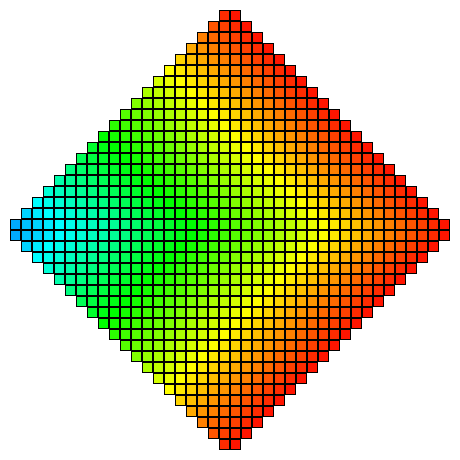
Bralin Coleman, Fall 2019:
def col(count: Int): Image = {
  count match
    case 0 => Image.empty
    case k => Image.rectangle(10, 10).fillColor(Color.hsl(k.degrees, 1, 0.5))
}

def box(count: Int): Image = {
  count match
    case 0 => Image.empty
    case n => col(n) `beside` box(n - 5)
}

def row(count: Int): Image = {
  count match
    case 0 => Image.empty
    case n => row(n - 10) `above` (col(n) `beside` box(n - 5))
}

def rowR(count: Int): Image = {
  count match
    case 0 => Image.empty
    case n => (col(n) `beside` box(n - 5)) `above` rowR(n - 10)
}

def diamond(count: Int): Image = {
  count match
    case 0 => Image.empty
    case n => row(n) `above` rowR(n)
}

val colemanResult = diamond(200)
// colemanResult.draw()
Kien Ta, Fall 2019:
def sample(radius: Double, samples: Int): Image = {
  val step = 10
  val dot = Image.triangle(10, 10)
  def loop(count: Int): Image = {
    val angle = (step * count).radians
    val r = count * radius / samples
    count match
      case 0 => Image.empty
      case n =>
        dot.at(r, angle).fillColor(Color.hsl((240 + count * 50).degrees, 1, 0.5)) `on`
          loop(n - 1)
  }

  loop(samples)
}
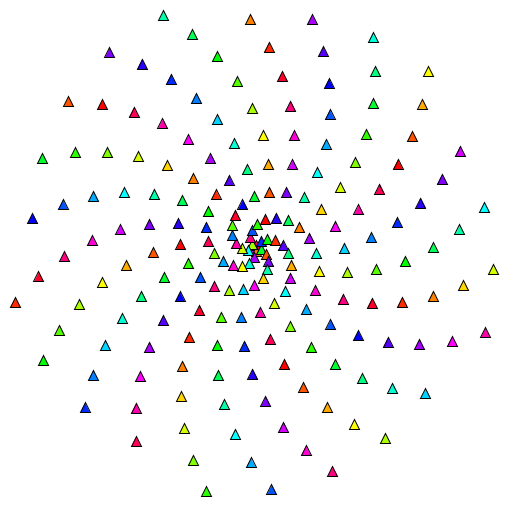
val taResult = sample(250, 200)
// taResult.draw()
Michael Lackey, Fall 2019:
val sky = Image.rectangle(400, 200).fillColor(Color.skyBlue).noStroke
val ground = Image.rectangle(400, 100).fillColor(Color.green).noStroke
val roof = Image.triangle(50, 50).fillColor(Color.red).noStroke
val frontDoor = Image.rectangle(50, 15).fillColor(Color.blue).noStroke `above`
  (Image.rectangle(10, 25).fillColor(Color.black).noStroke `on`
   Image.rectangle(50, 25).fillColor(Color.blue).noStroke)
val house = roof `above` frontDoor

def town(count: Int): Image = {
  count match
    case 0 => Image.empty
    case n => house `beside` town(n - 1)
}

val townPlace = town(5)
val lackeyResult = townPlace.at(0, -40) `on` ground.at(0, -100) `on` sky
// lackeyResult.draw()

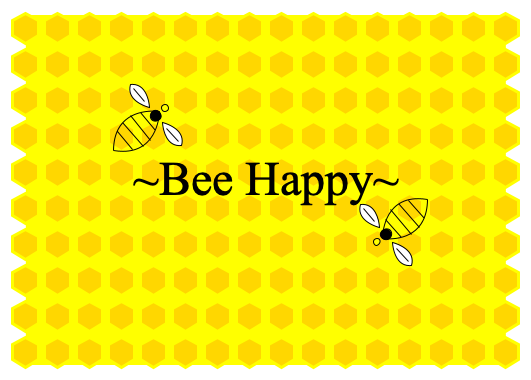
Abby Hutson-Comeaux, Fall 2019:
/* Establishing colors for the honeycomb & bee */
val orangeYellow = Color.rgb(255, 215, 0)
val yellow = Color.rgb(255, 255, 0)
val black = Color.rgb(0, 0, 0)
val white = Color.rgb(255, 255, 255)

/* Creating a plain yellow background */
val background = Image.rectangle(480, 350).fillColor(yellow).noStroke

/* oneComb generates each individual honey comb piece */
val oneComb = Image.regularPolygon(6, 15).rotate(90.degrees)
  .fillColor(orangeYellow).strokeColor(yellow).strokeWidth(3)

/* Method to create each row with the desired number of combs per row */
def combsPerRow(num: Int): Image = {
  num match
    case 1 => oneComb
    case num => oneComb `beside` combsPerRow(num - 1)
}

/* Method to actually create the honey comb that will be placed over the background */
def honeyComb(rows: Int): Image = {
  rows match
    case 0 => Image.empty
    case rows => combsPerRow(16) `above` honeyComb(rows - 1)
}

/* Making the bottom piece to the bee, including the lines */
val beeButt = Image.path(OpenPath.empty
  .moveTo(-30, 0).curveTo(-30, 0, 0, -35, 30, 0)
  .moveTo(-30, 0).curveTo(-30, 0, 0, 35, 30, 0)
  /* add lines for the bees body */
  .moveTo(-15, -12).lineTo(-15, 12)
  .moveTo(-5, -16).lineTo(-5, 16)
  .moveTo(5, -16).lineTo(5, 16)
  .moveTo(15, -12).lineTo(15, 12)
)

/* Adding the wing to the bottom of the bee */
val bottomWing = Image.path(OpenPath.empty
  .moveTo(0, 17).lineTo(0, 35)
) `on` Image.path(ClosedPath.empty
  .moveTo(0, 10).curveTo(0, 10, -15, 30, 0, 40)
  .curveTo(15, 30, 0, 10, 0, 10)
).fillColor(white)

/* Adding the wing to the top of the bee */
val topWing = Image.path(OpenPath.empty
  .moveTo(0, -17).lineTo(0, -35)
) `on` Image.path(ClosedPath.empty
  .moveTo(0, -10).curveTo(0, -10, -15, -30, 0, -40)
  .curveTo(15, -30, 0, -10, 0, -10)
).fillColor(white)

val beeBody = Image.circle(11).fillColor(black)
val beeHead = Image.circle(7).fillColor(yellow)

/* Combining the parts of the bee */
val bee = beeBody `on` beeHead.originAt(12, 0) `on` beeButt.originAt(-25, 0)
val finalBee = bee `on` bottomWing `on` topWing

val words = Image.text("~Bee Happy~").font(Font.defaultSerif.withSize(48))

/* Joining the text, honey comb, and bee all together */
val finalHoneyComb = words `on` (honeyComb(10) `on` background).originAt(0, 10)

/* Add bees to the drawing */
val oneBee = finalBee.rotate(40.degrees) `on` finalHoneyComb.originAt(120, -55)
val twoBee = finalBee.rotate(220.degrees) `on` oneBee.originAt(-230, 120)

val hutsonResult = twoBee
// hutsonResult.draw()